No monthly fees  ·  Runs on Google Sheets  ·  One-time payment

Plan every podcast episode and masterclass in one Google Sheet.

Schedule episodes, book guests, track releases, run live sessions and let viewers register on a public page. Twelve calendars update themselves. No app to install, no monthly subscription.

Buy Now — $9 ▶ Watch Demo

Part of SocioStacks DocSuite — trusted by 23,430+ customers across all products
🗓️
Synced to Google Calendar
Pricing Basics — Sat 10:00
Acme Podcasts
November 2026
M
T
W
T
F
S
S
26
27
28
29
30
31
1
2
3
4
5
6
7
8
9
10
11
12
13
14
15
16
17
18
19
20
21
22
23
24
25
26
27
28
29
10:00
Pricing Basics: live masterclass
Pricing Class · 37 of 50 seats
Scheduled
16:00
How Sam bootstrapped to revenue
Founder Stories · Guest: Sam Iyer
Release received
2 applications waiting
Review →
✅
New registration
Nisha Patel — Pricing Basics

From a blank Sheet to your first planned episode in 4 steps


Set up once. Then plan, record and publish from one place.

1
📋
Make your copy and run the wizard
Seven short questions: your name, programs, team, dropdown lists and time zone. About 30 minutes, once.
2
🎙️
Add your shows and people
Add each podcast or masterclass series, then your hosts, moderators and guests. Load sample data first if you want to see it working.
3
🗓️
Plan episodes with one form
Fill the Add episode form. The ID, calendar entry, Drive folder, guest booking and starter tasks are created for you.
4
🚀
Publish and fill your sessions
Share your public page, watch registrations arrive, send reminders and mark attendance. Calendars update on their own.

Everything a show needs.
Nothing you do not.

Content plan, calendars, guests, releases, tasks, run sheets and registrations. All inside your own Google account.

✓ One-time purchase   ✓ No app to install   ✓ Your data stays yours

Get PodcastX — $9 →

📝
A content plan with every field you need
Program, value point, content pillar, episode type, date, time, audience, title, image, guest, host, moderator, description, attachment, link, publication date and platforms, notes.
🗓️
12 monthly calendars that update themselves
Jan to Dec tabs plus a dynamic calendar with Year, Month and Program dropdowns. Add or move an episode and every calendar follows.
🎤
Hosts, guests and moderators
One People list with booking status per episode: Invited, Confirmed, Declined. A clash check warns you if someone is double-booked, even across time zones.
✅
Guest release check
Track each guest's release. PodcastX warns you, or blocks Scheduled and Published, until the release is received.
📑
Run sheet and deliverables
Write the script as timed segments. Tick off audio, video, thumbnail, transcript, show notes and clips before you publish.
🧰
A task board with 40 starter tasks
Add an episode and tasks appear with due dates, by type: interview, solo, panel, Q&A, live masterclass and more. Edit the templates to match your process.
💡
Idea Bank
Park ideas with a pillar, type and suggested guest. One click turns an idea into a planned episode.
🌐
Public registration page for viewers PRO
Viewers pick a session and register with name, email and optional phone. Capacity limits, a waitlist, a consent tick and optional email confirmation.
🙋
Guest and host application page PRO
People apply on a public page. You approve or decline each one before they can be booked.
🔁
Google Calendar sync and invites PRO
One calendar per program, kept in step with your plan. Invite hosts and guests only when you choose.
📱
A private web app for your team
Today view, Kanban plan board, calendar and applications queue, on any phone or laptop. Only people you share the Sheet with can open it.
📊
Dashboard now, metrics next METRICS COMING
The Dashboard shows today, the next five episodes, overdue tasks, registrations and alerts. A Metrics tab with plays and a monthly report is planned for the next version.

Real screens, real workflow


These are screenshots of PodcastX with sample data.
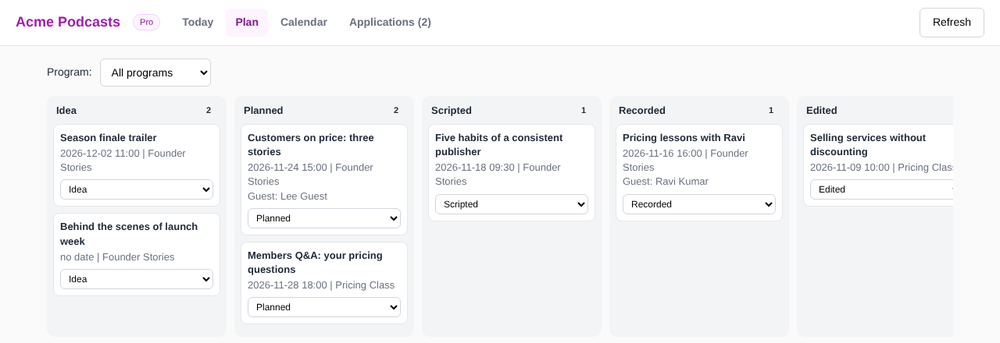
PodcastX plan board with episodes in Idea, Planned, Scripted, Recorded and Edited columns
The plan board: every episode by status, with one dropdown to move it forward.
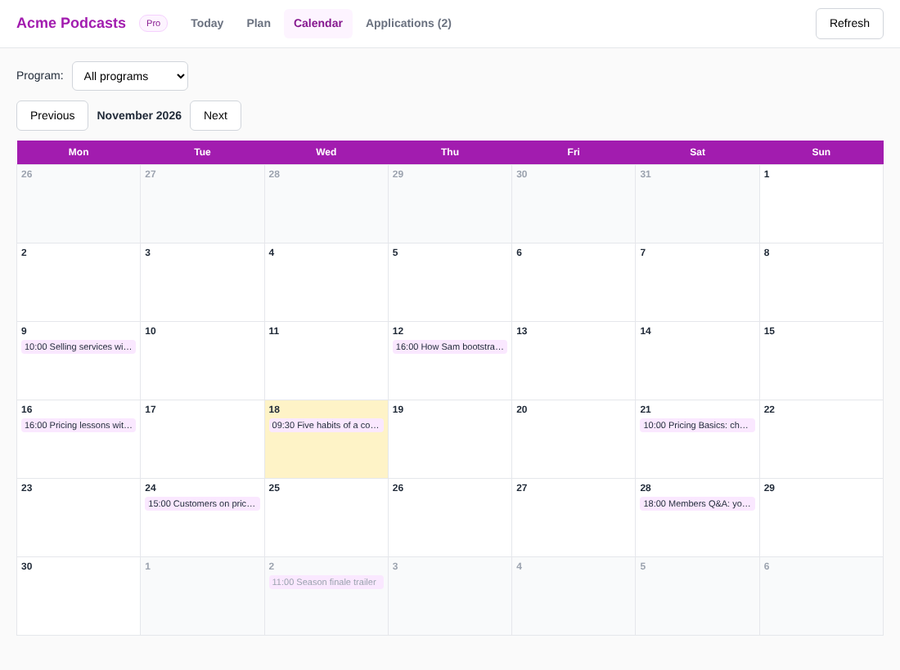
PodcastX monthly calendar showing episodes by date
The calendar: today highlighted, every episode on its day.
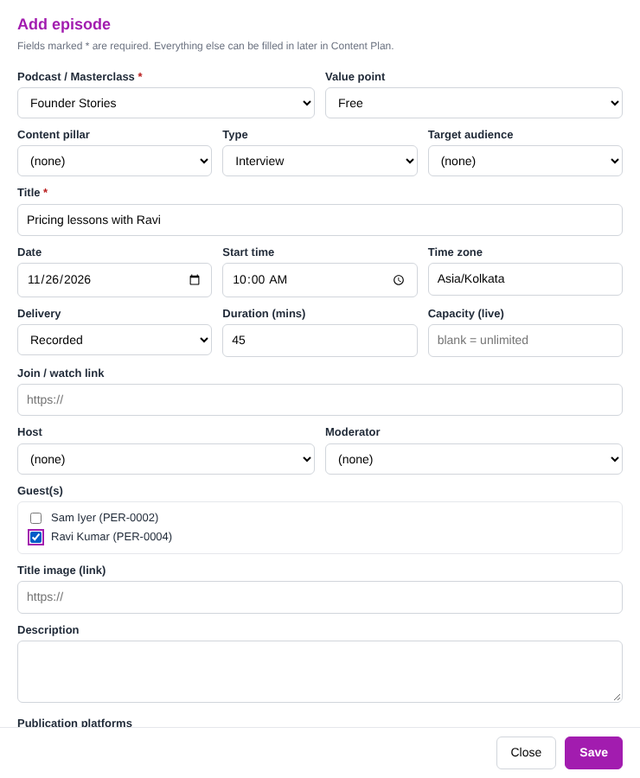
PodcastX Add episode form
The Add episode form: one screen, everything created for you.
Let viewers register and guests apply, without a Google login

Share one link. Viewers choose a session and sign up. Guests apply, and you decide who to book.

  • Mobile-friendly pages that show your logo and name
  • Only sessions you have opened (Planned, Scripted or Scheduled) appear
  • Capacity limit with automatic waitlist
  • Consent tick with your own wording, and optional email confirmation
  • A confirmation email and an "Add to Google Calendar" link for the viewer
  • Spam protection built in, and nobody can see who else registered
  • Join links are shown only after someone registers

Public pages run in a small separate project, so visitors can only submit a registration or an application. They can never reach your People list or settings.

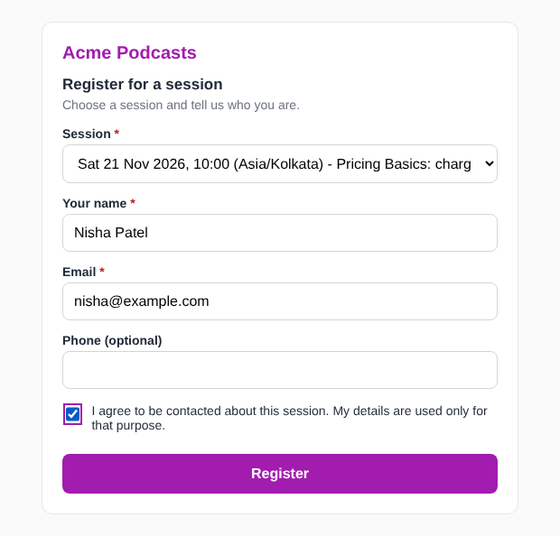
PodcastX public registration page with session, name, email and consent
What a viewer sees on your registration page.

PodcastX reminds you, and your audience


Digests, reminders and calendar events keep everyone on schedule.

📧
Morning and weekly digest
An email at 08:00 with today's episodes and tasks due, and a Friday summary of next week and anything unpublished.
⏰
Reminders to registrants
The day before a live session, everyone registered who gave consent gets an email with the time in the session's own time zone and the join link.
🗓️
Google Calendar events
Episodes appear on a calendar per program with the right time and join link. Hosts and guests are invited when you click Send invite.
⚠ Release needed
Episode EP-2026-017 "Customers on price" is set to Scheduled, but guest Lee Guest has no signed release yet.
Set the Permissions row to Received, then try again.

Built for creators, coaches and small teams


Interview shows, solo shows, panels, live masterclasses and replays all fit in one workbook.

🎙️
Podcasters
  • Plan a whole season on 12 calendars
  • Book guests and track their releases
  • Starter tasks for every episode type
  • Run sheet for each recording
  • Idea Bank for future episodes
🎓
Coaches and masterclass hosts
  • Live sessions with capacity and a waitlist
  • Public registration page with consent
  • Reminders the day before
  • Mark who attended afterwards
  • Free, Pro or Members label per session
👥
Small businesses and content teams
  • Manager and assistants share one Sheet
  • Task board with owners and due dates
  • Team web app: Today, plan board, calendar
  • Google Calendar for the whole team
  • Change history in the Activity Log

The simple alternative


Compare PodcastX with a plain spreadsheet template, a subscription project tool, and planning in your head and chats.

Feature PodcastX
$9 one-time
Plain Sheet template
Cheap but manual
Subscription tools
Monthly fee
Notes and chats
Free but scattered
12 self-updating calendars✓ Built inUsually manualVaries✗
Guest release check before publishing✓ Warn or block✗Varies✗
Public registration with capacity and waitlist✓ Pro✗Varies✗
Guest and host applications with approval✓ Pro✗Varies✗
Google Calendar sync and invites✓ Pro✗Varies✗
Task templates by episode type✓ 40 starter tasksRare✓✗
Time zone per episode and clash check✓✗Varies✗
Your data in your own Google account✓ Your Sheet✓✗ Their servers✓
Monthly subscription✗ None, $9 onceNoneEvery monthFree

Comparison is general. Features of other tools vary by product and plan.

12
Calendars that update themselves
$0
Monthly fees, ever
40
Starter tasks included
7
Setup wizard steps
🧠
One place for everything
Plans, people, releases, tasks and sign-ups live in one workbook, so nothing lives only in your head or in a chat thread.
🔒
Your data stays yours
Everything is stored in your own Google account. Public pages can only take sign-ups. They cannot read the rest of your Sheet.
⚡
Less typing, fewer mistakes
IDs, months, episode numbers, folders, tasks and guest bookings are filled in for you, so your plan stays consistent.

DocSuite 85% OFF — 1-Time Pay · Instant Download


One low lifetime price. No subscription. No renewal. Free future updates.

$9

Single Template

PodcastX Pro — lifetime license

  • ✓ Unlimited episodes and sessions
  • ✓ 12 calendars, task board, run sheets
  • ✓ Guest release check
  • ✓ Public registration + application pages
  • ✓ Google Calendar sync + email reminders
  • ✓ PCX license key + setup guides

Buy Now
Most Popular

$29

Any Five Templates

PodcastX + 4 more DocSuite templates

  • ✓ Everything in Single
  • ✓ 4 more DocSuite templates
  • ✓ Priority email support
  • ✓ Content Club Pro account

Buy Now

$99

Lifetime Access

All DocSuite templates + all future additions

  • ✓ All DocSuite templates
  • ✓ All future templates free
  • ✓ Agency / reseller rights
  • ✓ Set up for unlimited clients
  • ✓ WhatsApp priority support
  • ✓ Gesture Club membership

Buy Now

🔒 Secure payment via CCAvenue  ·  📥 Instant download after payment  ·  💬 Support via WhatsApp

Common questions


No. PodcastX is a Google Sheet with built-in code, in your own Google account. A free Gmail account works. Your team uses the Sheet, plus an optional web app. Viewers only open a web page.
Yes. Each show or series is a program. Episodes can be Live, Recorded or Hybrid. Live sessions can have a capacity, a join link and registration; recorded episodes simply follow the plan.
Only the people you share the Sheet with. The public pages run in a small separate project that can only take registrations and applications; they cannot read your People list, settings or anything else.
No. The public registration page works for anyone with the link. They enter a name and email, and optionally a phone number, and tick a consent box.
PodcastX Pro removes the 25-episode limit of the free mode and unlocks the public registration and application pages, email digests and reminders, and Google Calendar sync. Planning, calendars, guests, releases, tasks and the team web app are available in both.
No coding. A seven-step wizard sets up the Sheet in about 30 minutes. The public pages and the team web app each need a short one-time deployment in Google Apps Script. The Owner Setup Guide shows every click.
The Dashboard shows today's episodes, the next five, overdue tasks, registrations, applicants waiting and release alerts. A Metrics tab with plays by platform and a monthly report is planned for the next version.
Google limits how many emails a Google account can send each day (about 100 recipients on free Gmail and about 1,500 on Google Workspace; Google may change this). PodcastX stops before the limit and continues the next day.
PodcastX tracks each guest's release and records consent with a timestamp, and can delete one person's data on request. The agreement wording that comes with it is a template only. Replace it with text checked by a lawyer.
Every episode has its own time zone. Emails, the Google Calendar event and the "Add to Google Calendar" link all show the correct time, and the clash check works across time zones.

Help Centre


Setup guides, video tutorials, and WhatsApp support.

Stop planning your show in a dozen places.

Plan episodes, book guests, fill your live sessions and keep every calendar in step. One Sheet. One payment. Runs forever.

🔒 Secure payment via CCAvenue  ·  📥 Instant download  ·  🔄 Free lifetime updates  ·  💬 WhatsApp support

✅ Trusted by 23,430+ customers across all SocioStacks products ❤️
Reviews on Google profile

Questions? Let's Chat
Need Help? Chat with us
Click one of our representatives below
Mona
Sales Support
I'm Online
Amit
Customer Support
I'm Online
Arup
Technical Support
I'm Online